
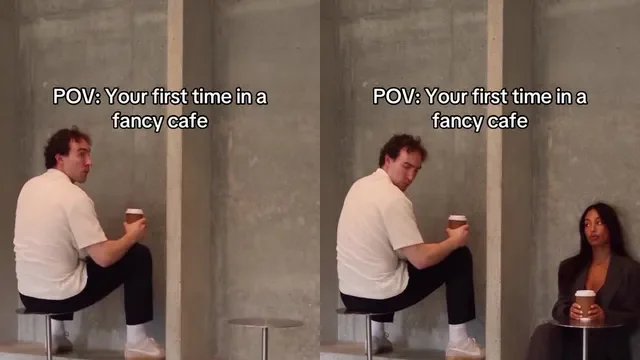
What does “POV: Your First Time in a Fancy Cafe” mean?
POV means “point of view”: the caption asks viewers to imagine the first-time visitor who mistakes a small cafe table for a seat. It does not require a literal first-person camera shot; showing the person and the bench together makes the joke readable.
The sequence matters more than the caption: the visitor sits on the table, the regular uses the bench, the visitor realizes the error, and then moves. This is a visual comedy scene, not advice on cafe etiquette.
How do I make a vertical POV cafe video from my photo?
Start with one clear, consenting adult portrait for the first-time visitor. The second portrait is optional and replaces the cafe regular who sits on the bench. In this studio, choose 9:16 for a tall frame and review the 20-second result, resolution and one-time checkout price before paying.
You do not need to upload or edit the original meme clip. This tool creates new reference-guided frames from your photo; exact facial likeness, furniture and comic timing can vary. A 16:9 wide frame is also available if that better suits your destination.
- Upload a JPG, PNG or WebP portrait with one visible adult face to Protagonist.
- Optional: upload a separate portrait to replace the cafe regular.
- Choose 9:16 and either 480p or 720p. Confirm the displayed price before checkout.
- After payment, monitor your existing order in the same browser; do not pay again while it processes.
What should I check before adding a POV caption?
Watch the completed MP4 before sharing: the table and bench should both be visible, the second person should sit on the bench, and the protagonist should move only after noticing the mistake. Download the file from Generated videos within 30 days; the website does not preserve it indefinitely.
Add a short caption such as “POV: your first time in a fancy cafe” in your own editor after downloading. Keep the text away from faces and the table-versus-bench reveal. If the shot does not read clearly without text, a caption alone will not repair the seating story.
Can I post it directly to TikTok or Instagram Reels?
No. This studio generates and lets you download an MP4; it does not connect to TikTok or Instagram or publish on your behalf. Upload the saved file through the platform or editor you choose, and preview the final crop and caption there.
Only upload portraits of consenting adults. A sample video or a trending track is not proof that you have rights to reuse someone else’s audio or footage; check the rights for the sound you choose. Sharing does not guarantee views or a result identical to the reference.
Common questions
Do I need the original Fancy Cafe video to make a POV version?
No. Upload your own consenting adult portrait to the studio. It uses a scene reference to generate new frames; it does not edit the original clip.
Does Fancy Cafe AI upload the finished video to TikTok or Reels?
No. Download the completed MP4 in the same browser, then upload it yourself through your chosen platform. You can add a short POV caption in your editor.
Explore the protagonist and optional cafe regular roles. Choose your characters, check the final price and create your own wrong-seat moment.
Try the video studio →